

How to sync your Hyperprop accounts with Tradervana
By UncTheTrader · Updated November 16, 2026 · 4 min read
To sync Hyperprop with Tradervana, create a read-only personal API key in Hyperprop and paste it into Broker Sync. One connection brings in every account on your Hyperprop login, whichever firm it belongs to. Once it's connected, the Hyperprop trading journal shows what Tradervana does with those trades.
Hyperprop isn't a prop firm. It's the trading platform that prop firms such as MyFundedFutures and Traders Launch run their evaluations and funded accounts on. Your firm sells you the account and sets its rules and payouts; Hyperprop is where you place the trades.
Connecting Hyperprop to Tradervana pulls your trades into your journal automatically, with no CSV exports and no manual entry. Because Hyperprop holds your accounts from every firm on one login, one connection brings in all of them, futures and perpetuals alike. It uses Hyperprop's own API, so setup is a matter of creating a read-only key and pasting it in.
Before you start
- Broker sync is a Pro feature. On the free plan you can still import trades by hand (including Hyperprop's CSV export); auto-sync needs Pro (see the Pro plan guide).
- You need a Hyperprop login with at least one account on it. When you buy an evaluation or a funded account from a firm that runs on Hyperprop, the firm creates the account and sends you a one-time import key. Redeem it in Hyperprop under Trading Accounts to attach the account to your login. Hyperprop's own free practice accounts work too.
- A new evaluation only starts on your first order, so an account with no trades yet won't have anything to sync.
Create a read-only personal API key
- Sign in to Hyperprop, click your profile picture in the top right, and choose API keys from the menu. (Opening Security and finding API keys there works too.)
- Choose Create key and give it a name such as "Tradervana".
- Set Type to Personal and Access to Read only. A read-only key can read your accounts and balances, positions and orders, and trade and journal history. It cannot trade or close positions, and that's all Tradervana needs.
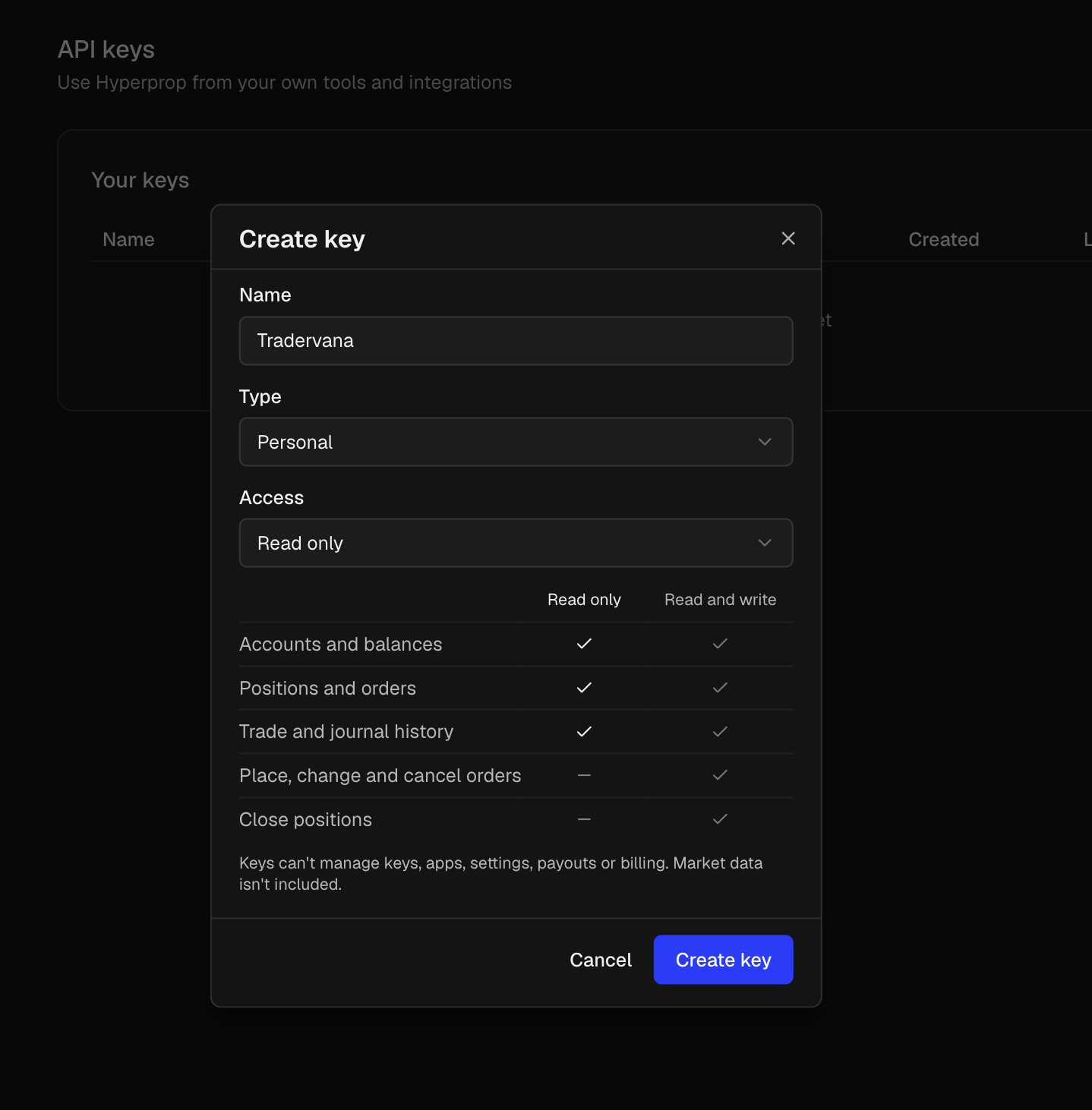
- Click Create key and copy the key, which starts with
hpp_. Hyperprop only shows it once, so copy it before you close the dialog.
Treat the key like a password. Anyone with it can read your account data, across every firm on your Hyperprop login. You can revoke it from the same API keys window at any time, and syncing stops as soon as you do. Tradervana only ever reads your data and never places or changes orders.
Connect
- In the sidebar, open Broker Sync.
- Choose Hyperprop.
- Paste the key and, optionally, give the connection a label.
- Click Connect. The first sync starts right away.
What happens after you connect
Each account on your Hyperprop login becomes its own account in Tradervana, whichever firm it belongs to. Every filled order is matched flat-to-flat into round trips, the same way as our other integrations, and re-syncing is safe: matching trades are updated in place, never duplicated.
Your trades. Trading fees are counted in each trade's costs, so net P&L
lines up with Hyperprop's. CME futures keep their contract symbol, for example
MNQZ6. Perpetuals show as perpetuals, for example XAUUSD-PERP. Each trade's
stop-loss and take-profit come across too, and the stop is the one you started
with, not where you trailed it to, so your R is measured against the risk you
planned. A position that's still open shows up once you close it.
Your rules. Your firm sets the rules, and Hyperprop reports them per account. The first time an account has trades, Tradervana creates a rule set for it, named after the plan (for example "Auto Premium 100K Legacy NYC Evaluation"), with the profit target, max loss, drawdown type, contract limit and daily profit cap Hyperprop sends. Anything Hyperprop doesn't send, such as inactivity days and fees, is left for you to fill in. An account that already has a rule set keeps it, and a rule set is never rewritten later, because a firm's rule changes apply to new accounts, not ones you already own.
What we don't read. Market data and prices aren't included in a personal key, so charts and live valuations aren't part of the sync.
Who to ask about what
- Buying, resets, payouts, or which account you were given: your prop firm. Hyperprop doesn't sell evaluations or move money.
- The trading platform itself: Hyperprop's support.
- A trade that looks wrong in your journal: us.
If you trade Traders Launch or MyFundedFutures accounts on Hyperprop, our rules guides for Traders Launch and MyFundedFutures cover how those rules work.
If something looks off
- "Rejected the API key." The key was copied incorrectly or has been revoked. Create a fresh read-only key and paste it again.
- An account is missing. New accounts appear on the next sync. An account with no trades yet doesn't appear until its first trade. If one still doesn't show, tell us.
FAQ
Is Hyperprop a prop firm?
No. Hyperprop is the trading platform that firms such as MyFundedFutures and Traders Launch run accounts on. Your firm sets the rules and payouts.
Does one key sync every firm on my Hyperprop login?
Yes. Each account on your Hyperprop login becomes its own account in Tradervana, whichever firm it belongs to, futures and perpetuals alike.
What kind of API key do I need?
A personal key with Read only access. It can read your accounts, positions, orders and trade history, and it can't trade. Hyperprop shows the key once, and it starts with hpp_.
Does Tradervana set up my rules automatically?
Partly. The first time an account has trades, Tradervana creates a rule set from what Hyperprop reports, such as profit target, max loss and drawdown type. You fill in what Hyperprop doesn't send, like inactivity days and fees.
Is Hyperprop sync on the free plan?
No. Auto-sync is part of Pro. Try Pro free for 14 days.
See the Hyperprop trading journal for what Tradervana does with the trades you sync.
Sync your trades automatically, then save your firm's limits as a rule set and Tradervana shows your live distance-to-breach on every account.
Track these rules live in Tradervana.
Try Pro free for 14 days